
I’ll be honest, this started as an Upwork message to my own team, not a blog draft. We’d just wrapped a weekend List to get our automation pipeline live on app.brewandbuzz before a client onboarding on Monday, and somewhere around hour 50, someone joked, we should write this up. So here we are.
This is the story of how we built a working LinkedIn growth automation pipeline in about 60 hours, what app.brewandbuzz actually is, what broke along the way, and what happened once we actually put it in front of a client.
What Is a LinkedIn Growth Automation Tool?
Quick context before the story, because I skipped this the first time around and it matters: app.brewandbuzz is our internal automation layer, built on top of ReechOut, our LinkedIn CRM. Where ReechOut tracks relationships and conversations, app.brewandbuzz is where the workflows live: prospect discovery, outreach sequencing, follow-up timing, reporting. We looked at a few third-party automation tools before deciding to build this ourselves, mostly because we wanted the sequencing logic and the CRM data sitting in one place instead of stitched together across separate platforms.
How to Build LinkedIn Growth Automation: The 4-Step Process
If you’re building something similar, this is roughly the order that actually worked for us:
- Map the workflow before building anything — who gets contacted, in what order, what triggers a follow-up, what counts as a real reply versus a polite no.
- Build the core sequencing logic — connection requests, staggered follow-ups, reply detection.
- Test on a small, real batch — not a demo list, actual live prospects.
- Clean up, document, and hand it to the team.
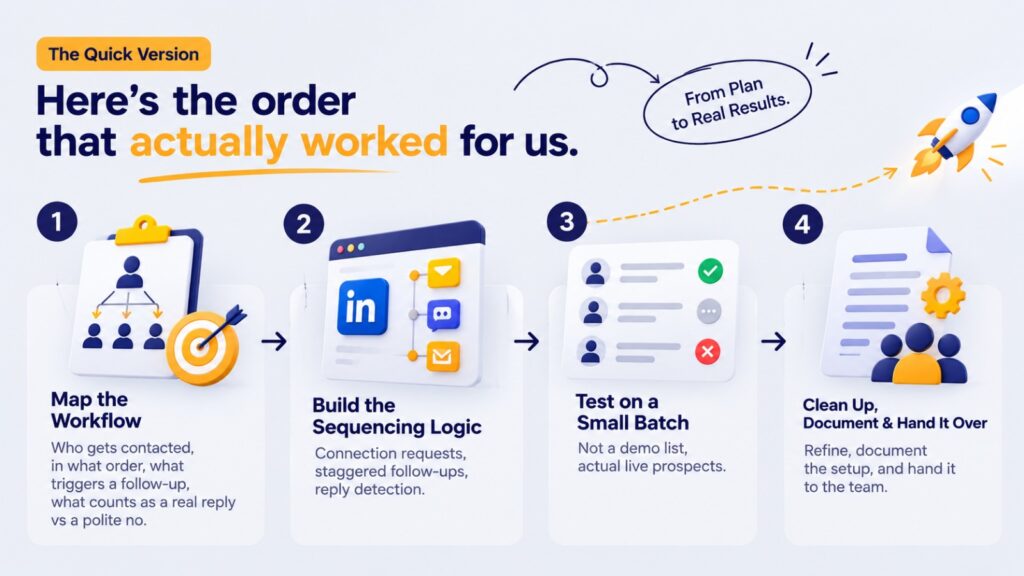
Here’s how those four steps actually played out over one very long weekend.
Step 1: Mapping the LinkedIn Automation Workflow
We didn’t touch code for the first stretch. We mapped the whole workflow on a whiteboard every trigger, every branch. Skip this step, and you don’t get automation; you get a faster version of chaos. I’ve watched other agencies make that mistake, and I wasn’t going to repeat it under a deadline.
Step 2: Building the Automation Sequencing (And the Bug That Taught Us the Most)
This is where it got messy. We wired up prospect discovery filtered by ICP, a staggered connection request sequence, and a follow-up cadence that should have stood down the moment someone replied.
Should have. Around hour 22, our reply-detection logic had a timing gap it checked for replies on a fixed interval instead of in response to the reply itself, so a handful of test contacts who replied between checks got a follow-up message anyway. Two of them got a just following up message minutes after they’d already responded. Not catastrophic, just embarrassing, and exactly the kind of thing that makes a prospect think Oh, this is a bot. We rebuilt that piece to fire off the reply event itself rather than a timer, which also made the whole sequence feel less mechanical downstream. If you’re building this yourself, budget real time for exactly this kind of failure; the first version of any sequencing logic rarely survives contact with real humans.
Step 3: Testing LinkedIn Automation on a Real Prospect List
We ran the fixed pipeline against a small live batch before trusting it with client volume and kept the sending pace well inside LinkedIn’s own rolling weekly connection limits (roughly 100 requests per week is the commonly observed unofficial ceiling, higher for accounts with strong Social Selling Index scores). Watching real replies come in taught us more in two hours than internal testing had in three days.
Step 4: Launch — What Changed After Go-Live
The last stretch was unglamorous cleaning up edge cases, fixing the reporting layer, writing internal docs so future-us wouldn’t have to reverse-engineer our own decisions.
Monday came. The client’s LinkedIn account went live on the pipeline. I won’t pretend it transformed overnight but over the following weeks, the team spent noticeably less time on manual prospecting for that account, and follow-ups stopped slipping through the cracks the way they used to when someone had to remember them manually. That’s really the outcome that mattered: not a dramatic spike in leads overnight, but a process that held up without someone babysitting it.
LinkedIn Lead Generation: What Automation Actually Changed
The honest answer: it didn’t make LinkedIn magic. It took the repetitive 80% of the work finding prospects, sequencing outreach, tracking follow-ups off the team’s plate, so people could spend their time on the part that needs a human: reading a reply, understanding context, having the actual conversation.
That’s the real point of LinkedIn lead generation done well. Automation carries the volume. People carry the relationship. We wrote more about that balance and about deciding what to automate versus what to keep manual in our piece on LinkedIn automation vs. manual prospecting, if you want the fuller breakdown.
LinkedIn Automation Best Practices (What We’d Tell You to Do Differently)
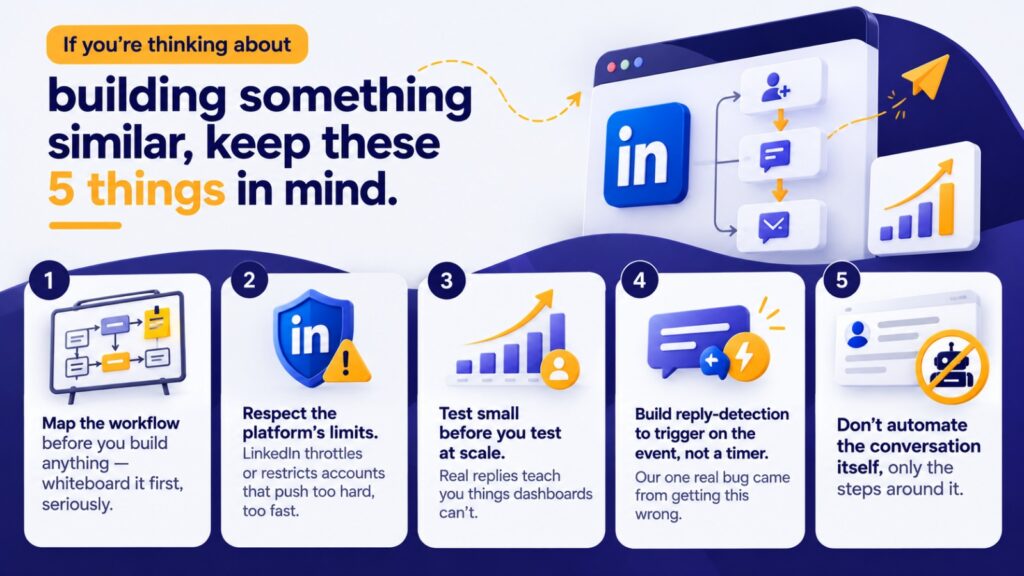
- Map the workflow before you build anything; whiteboard it first, seriously.
- Respect the platform’s own limits. LinkedIn throttles or restricts accounts that push too hard, too fast.
- Test small before you test at scale. Real replies teach you things dashboards can’t.
- Build your reply-detection to trigger on the event, not a timer. Our one real bug came from getting this wrong.
- Don’t automate the conversation itself, only the steps around it.
Final thought
We built this because our own team needed it, not as a product pitch. But if you’re a founder or CEO watching your team burn hours on manual LinkedIn prospecting, the lesson from our 60 hours and the one bug that taught us the most is simple: build the automation around the relationship, not instead of it. If you want that same kind of structured LinkedIn growth automation working for your business instead of building it from scratch yourself, check out our LinkedIn Growth services; it’s the productized version of everything we learned building this.
Frequently Ask Questions
It’s the use of structured workflows or tools to handle repetitive LinkedIn prospecting tasks discovery, connection sequencing, follow-ups while keeping actual conversations human.
Yes, as long as it respects LinkedIn’s own sending limits and avoids bot-like timing patterns — that’s usually what triggers account restrictions, not automation itself.
Ours took about 60 hours from whiteboard to working pipeline, but the timeline depends heavily on how complex your sequencing logic and CRM integration need to be.
No, automation handles repetitive volume well, but qualification, objection handling, and relationship-building still need a human for genuine LinkedIn lead generation to convert.
Skipping the workflow-mapping step and jumping straight to building that’s usually what causes the logic to break once it meets real, unpredictable human behavior.
By consistently and safely reaching the right audience at scale, then routing every real reply to a human fast enough that the conversation doesn’t go cold.
Only if you have the time and technical capacity to test and maintain it properly; otherwise, working with a team that already has a built and tested system tends to be faster and safer
Platforms that respect LinkedIn’s connection and messaging limits, integrate CRM-style tracking, and keep a human in the loop for actual conversations which is exactly how we built app.brewandbuzz on top of ReechOut.