
Your sales team spends three hours finding prospects on LinkedIn. Another two hours sending messages. Then someone has to remember who needs a follow-up.
By Friday, your team has been busy prospecting but how much of that time actually went into selling?
This is the question behind the growing debate around LinkedIn automation vs. manual prospecting. Manual prospecting gives salespeople control. Automation gives them scale and consistency. But the real difference isn’t simply about doing more work in less time. It’s about what your sales team spends its time doing.
Instead of spending hours searching for prospects, copying information, sending repetitive messages and tracking follow-ups, a structured automated prospecting system can take care of many repetitive steps—while salespeople focus on conversations, qualification, and closing.
For CEOs, founders, and B2B sales leaders, the question isn’t: Should we automate LinkedIn?
It’s: Which parts of our prospecting process should be automated, and which parts still need a human?
Key Takeaways
- Manual prospecting gives reps full context on each account but caps daily volume, since thorough one-by-one research doesn’t scale with headcount alone.
- LinkedIn’s User Agreement restricts scraping and bulk automated connection activity; workflows built on unauthorized automation risk account restrictions, so automation strategy has to work within LinkedIn’s platform limits, not just internal sales targets.
- Messages that reference a specific, verifiable detail about the prospect (an expansion, a hire, a funding event) are widely reported to outperform generic templated outreach in reply rate.
- Automation expands operational capacity how many prospects a team can reach but does not by itself improve targeting or conversion; without a defined Ideal Customer Profile, automation just produces low-quality leads faster.
- The most durable model pairs automated discovery, filtering and follow-up sequencing with human-led qualification, objection handling and closing.
What Is Manual LinkedIn Prospecting?
Manual prospecting means your sales team handles most of the process themselves. A typical workflow looks like this:
- Search LinkedIn
- Find a potential prospect
- Open their profile
- Check their company
- Decide whether they’re relevant
- Send connection request
- Write a message
- Wait for response
- Remember to follow up
- Update spreadsheet or CRM, then repeat
There is nothing inherently wrong with this approach. In fact, manual prospecting can work extremely well when the target audience is small, highly specialized or requires substantial research.
The problem appears when the business wants to increase prospecting volume. The salesperson who can carefully research 20 prospects may struggle to manually research 200.
That’s where automation enters the conversation.
What Is LinkedIn Automation?
LinkedIn automation uses software, workflows or AI-assisted systems to handle repetitive prospecting activities. Depending on the system, this can include:
- Prospect discovery
- Audience filtering
- Profile identification
- Connection workflows
- Message sequences
- Follow-ups
- Lead data collection
- Keyword-based prospect discovery
- Campaign management
- Lead tracking
- Reporting
The purpose isn’t simply to send more messages.
The purpose of automated prospecting is to create a repeatable process around the activities that don’t require a salesperson to manually perform every single step.
LinkedIn Automation vs Manual Prospecting: The Real Difference
The easiest way to understand the difference is to look at the individual stages of prospecting.
| Prospecting Activity | Manual Prospecting | Automated Workflow |
| Finding prospects | Salesperson searches individually | Defined targeting + automated discovery |
| Filtering prospects | Manual review | Filters and predefined criteria |
| Connection workflow | One-by-one | Structured sequence |
| Initial outreach | Manually written/sent | Templates + personalization workflows |
| Follow-ups | Manually tracked | Scheduled workflow |
| Lead organization | Spreadsheet/CRM updates | Centralized workflow |
| Scaling | Limited by salesperson time | More scalable |
| Human involvement | High | Focused on higher-value activities |
The biggest change is therefore not just speed. It’s the allocation of human time.
1. Manual Prospecting Gives You More Control
Let’s start with the strongest argument for manual prospecting. A salesperson can look at a prospect’s profile and notice things an automated workflow may miss.
For example:
A CEO posts: We’re opening our second manufacturing facility in Germany.
A salesperson researching that account may immediately recognize an opportunity for an export consulting company, logistics provider, technology vendor or industrial supplier.
A human can interpret context. That’s valuable.
Manual prospecting can therefore be particularly useful when:
- Your market is highly specialized
- Each prospect requires detailed research
- Your average deal value is high
- The buyer journey is complex
- You have a small target account list
- Personalization is critical
Automation should not eliminate this human judgment.
2. Automation Changes the Economics of Prospecting
Now consider a salesperson who spends four hours every day on prospect research. That’s potentially 20 hours a week. And the salesperson still has:
- Calls to make
- Meetings to attend
- Proposals to prepare
- Existing customers to manage
- Follow-ups to complete
- Deals to close
This is where B2B sales automation can change the workflow.
Instead of making the salesperson manually perform every repetitive action, automation can handle defined parts of the process.
The salesperson can then spend more time on activities such as understanding the prospect, handling objections, building relationships, running discovery calls, qualifying opportunities and closing deals.
Automation doesn’t replace selling. It can reduce the amount of administrative prospecting surrounding the selling process.
3. Automation Makes Follow-Up More Consistent
Here’s a simple problem that happens in almost every sales organization: A prospect responds. The salesperson has a conversation. The prospect says:
Let’s reconnect next month.
Then the salesperson gets busy. Three weeks later, the opportunity has disappeared from the radar.
Follow-up is one of the areas where structured workflows can help. Instead of relying entirely on memory, a prospect can move through a predefined sequence — for example:
- Day 1: Connection
- Day 3: Relevant follow-up
- Day 7: Value-based message
- Day 14: Additional touchpoint
- Salesperson takes over once there is engagement
The exact sequence should depend on the business, audience and platform rules.
The important principle is simple: No relevant prospect should disappear simply because someone forgot to follow up.
4. Automation Helps With Scale
Imagine two scenarios.
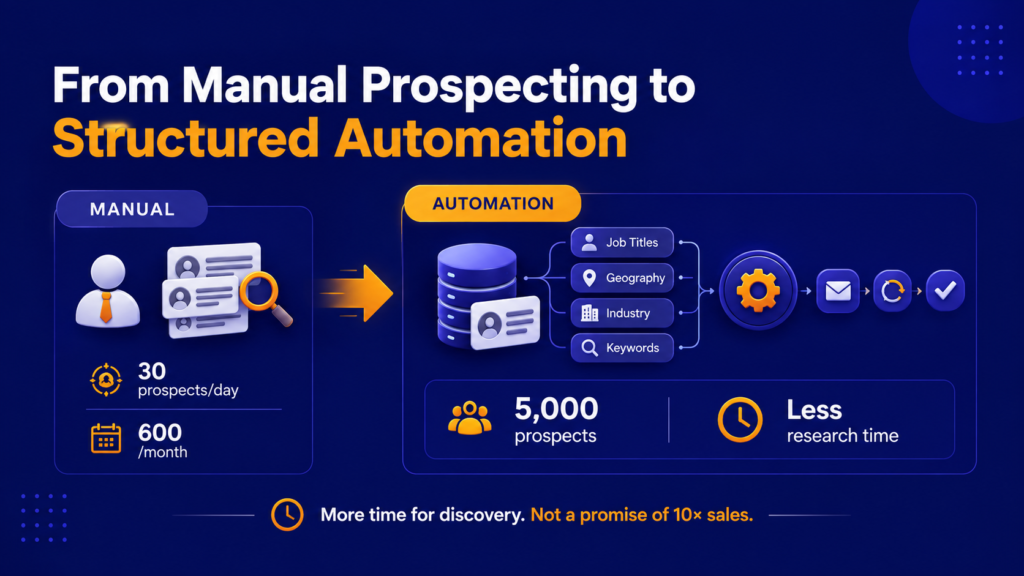
The result isn’t necessarily 10x more sales. That’s an important distinction. Automation increases operational capacity. It does not automatically increase conversion rates.
5. More Automation Does Not Mean Better Leads
This is where businesses often get automation wrong. They think: More prospects = more leads = more sales. Not necessarily.
Suppose your sales team generates 2,000 prospects but only 100 match your Ideal Customer Profile.
You haven’t solved the lead-generation problem. You’ve created a data problem.
A good automated prospecting system therefore starts with targeting. Define:
Who?
CEO, Founder, Managing Director, Procurement Head, Sales Director, etc.
Where?
India, UAE, UK, USA, Europe, or specific cities/markets.
What industry?
Manufacturing, SaaS, healthcare, logistics, education, etc.
What company size?
Startups, SMEs, mid-market or enterprise.
What business problem?
Export expansion, lead generation, digital transformation, recruitment, automation, etc.
The better the targeting, the more useful automation becomes.
6. Personalization Still Matters
Automation becomes dangerous when every prospect receives the same generic message.
Imagine receiving this:
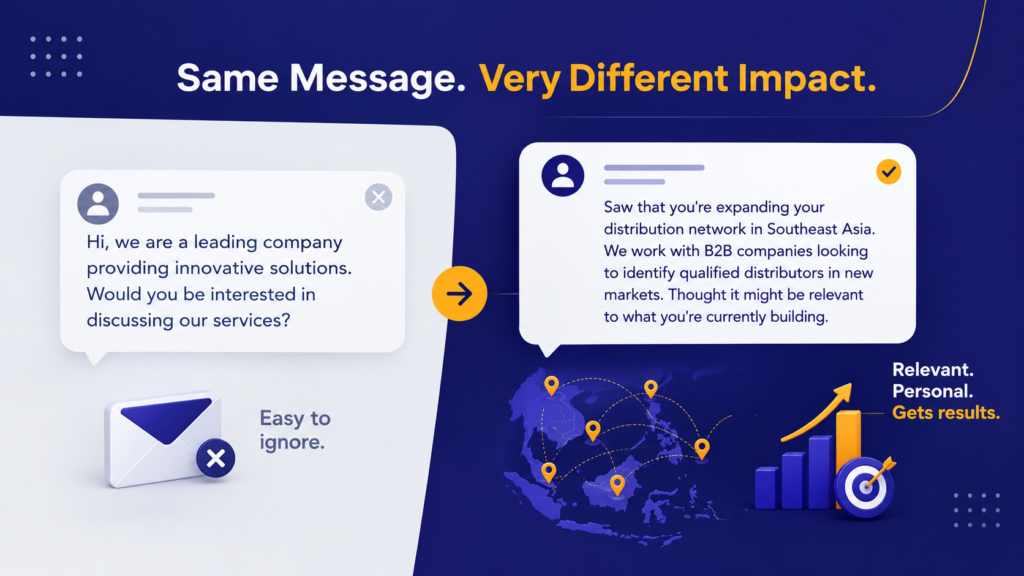
The second message has context.
The goal of automation should therefore be: Automate the workflow. Not: automate the relationship.
That’s a crucial difference.
7. What Should You Automate?
A useful rule is:
Automate repetitive. Keep strategic human.
Good candidates for automation
- Prospect discovery
- Lead filtering
- Data organization
- Repetitive workflow steps
- Follow-up reminders
- Outreach sequencing
- Lead tracking
- Reporting
- Campaign organization
Activities that should retain human involvement
- Strategic messaging
- Complex personalization
- Sales conversations
- Negotiation
- Relationship building
- Proposal discussions
- Objection handling
- High-value account research
The objective is to create a human + automation workflow, not an entirely robotic sales process.
8. Manual vs Automated Prospecting: Which One Should a B2B Company Use?
It doesn’t have to be one or the other.
In many cases, the strongest model is a combination:
- Automation — identify and organize potential prospects based on your ICP
- Automation — run defined outreach and follow-up workflows where appropriate
- Human — a prospect responds and a salesperson takes over
- Human — the salesperson understands the requirement
- Human — the sales team qualifies the opportunity and moves it into the sales process
This creates a useful division:
Machines handle repetition. People handle relationships.
9. What Changes for a CEO or Founder?
For a CEO or founder, the biggest benefit may not be sending more LinkedIn messages.
It may be getting the sales process out of the founder’s head and into a repeatable system.
Many founder-led businesses operate like this:
I know everyone in my network. I’ll personally follow up. Send me the lead and I’ll handle it.
That can work at the beginning.
But as the business grows, the founder becomes the bottleneck.
A structured LinkedIn prospecting system can help create a process where, instead of the founder manually managing every step, work flows through defined stages:
- Target market
- Prospect discovery
- Qualification
- Outreach
- Engagement
- Sales conversation
- Opportunity
10. What Changes for a Sales Team?
For sales teams, automation can change the role of prospecting.
Instead of spending the majority of the day searching for people, salespeople can potentially spend more time on:
- Active conversations
- Qualified leads
- Discovery calls
- Account research
- Follow-ups
- Opportunities
- Closing
This doesn’t mean prospecting disappears.
It means the salesperson’s time can be concentrated on the parts of prospecting that require judgment and human interaction.
The Biggest Mistake: Automating Before Fixing the Process
Automation cannot fix a broken sales strategy.
If your company doesn’t know:
- Who its ideal customer is
- What problem it solves
- Who makes the buying decision
- Why prospects should care
- What message resonates
- How leads are qualified
then automation can simply make the wrong process happen faster.
Before implementing automation, answer five questions:
- Who are we targeting?
- What business problem are we solving?
- Why should this prospect talk to us?
- What qualifies someone as a good lead?
- What happens after someone responds?
Once these are clear, automation becomes much more useful.
LinkedIn Automation Is a Workflow, Not a Magic Button
There is a temptation to think of automation as:
Click a button → get leads.
Real B2B prospecting doesn’t work that way.
A sustainable system typically involves the following stages, in order:
- Audience research
- ICP definition
- Prospect discovery
- Targeting
- Relevant messaging
- Outreach
- Follow-up
- Human conversation
- Qualification
- Sales pipeline
Automation can support several of these stages.
It cannot replace the underlying strategy.
So, LinkedIn Automation vs Manual Prospecting—What Actually Changes?
The fundamental difference is where your team’s time goes.
With completely manual prospecting, people spend significant time on repetitive activities:
Search → check → copy → message → track → follow up → repeat.
With a structured automated workflow, more of those repetitive activities can be systematized:
Target → discover → sequence → engage → human conversation → qualify.
That can make prospecting more consistent and scalable. But automation doesn’t remove the need for strategy, personalization or human sales conversations.
The strongest approach is usually not manual vs automation.
It’s: Automation for repetition. Humans for relationships.
A Practical Framework for B2B Sales Automation
Before automating your LinkedIn prospecting process, build these six layers:
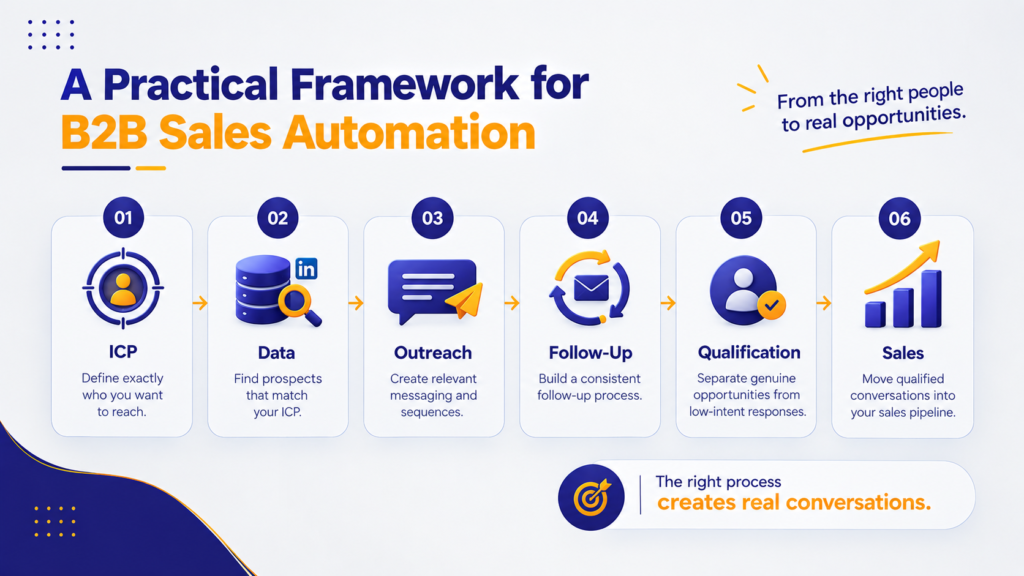
This is where B2B sales automation becomes more than a technology decision. It becomes a sales-process decision.
Final Thought
If your sales team spends most of its time finding prospects, copying data, sending repetitive messages and remembering follow-ups, you may not have a lead-generation problem.
You may have a process problem.
LinkedIn automation can help solve parts of that problem—but only when it sits on top of a clear ICP, relevant messaging, a defined sales process, and a workflow that respects LinkedIn’s platform rules.
The goal isn’t to make your business sound more automated.
The goal is to make your sales team more productive without making your prospect experience less human.
Automate the repetitive work. Keep the important conversations human.
Want to Build a More Systematic LinkedIn Prospecting Process?
Brew & Buzz Digital’s LinkedIn Growth solution combines prospect identification, audience targeting, keyword-based discovery, outreach workflows, follow-ups and automation to help B2B businesses build a more structured LinkedIn growth process.
Frequently Ask Questions
Third-party automation tools generally operate outside LinkedIn’s official terms, and heavy or careless use can trigger account restrictions — which is why most structured LinkedIn automation vs manual prospecting strategies use automation for research and sequencing, not full end-to-end messaging.
Manual prospecting relies on a salesperson to research, connect, message, and follow up individually; automated prospecting systematizes the repetitive steps — discovery, sequencing, follow-up reminders — while keeping conversations human.
No. Automation increases operational capacity, but qualification, objection handling, and relationship-building still require human judgment for B2B lead generation to convert.
Yes for small, highly specialized target accounts or high deal values, manual prospecting’s context and personalization typically outperform automated outreach.
Strategic messaging, negotiation, and account-specific personalization should stay human; automating these usually produces generic messages prospects ignore.
It varies by market and deal complexity, but manual research scales linearly with time — which is the core limitation automated prospecting is built to solve.
Not automatically. Without a defined ICP, automation just produces more unqualified data faster — targeting quality determines whether automation improves lead generation.
A combined model: automation handles discovery, sequencing, and follow-up reminders, while the founder or sales team takes over the moment a prospect responds.